
Regular readers will notice a whole new look and structure. I like to mix it up every couple of years, but this time I took it a step further.
For the last 14 years, this blog has been on a paid WordPress.com subscription. It has been 14 good years, with no major complaints. Though, every time I came around to refreshing the look, wrestling with the WordPress themes was always a pain in the ass. I felt I was always compromising. There would always be something that I didn't care for, and the anally retentive part of my personality, had to dig deep to just let it go.
WordPress limitations
One of my biggest pet peeves with WordPress was its poor visibility into the meta data that would allow the site to be truly exposed to the search engines and AI crawlers. These were baked into the theme and hard to get it. Even with either Jetpack plugin, it still was a hack.
Running various SEO tools at my site (including the official Google one) issues were being flagged - but I couldn't address them.
WordPress was starting to get more expensive and I questioned whether or not I was getting value for money. After much analysis I decided to take the step of migrating away. Though I didn't want to get into the hosting business.
A blog is something that only ever gets updated when a new article is published. When that is done, it is basically a flat static HTML site. That then opens up a number of options, including AWS S3 and CloudFlare with their Worker pages. I don't need a blog hosting site and all the costs/complications that come with it.
Blog CMS
Ultimately I needed a simple CMS that would allow me to create a template, then after pouring in my content (pages/posts) it would spit out a folder of static pre-built HTML pages, that I can uploaded somewhere. In today's AI age, the simplest thing was to create my own CMS.
Built around the Astro framework, that manages the theme format, I created a React web site, that would allow me to manage my content, including uploading (and resizing) photos. Wanted to keep things simple which meant I didn't want to load my content into a database. Instead, I exported all my content from WordPress, and converted that XML content into individual markdown pages. The media was then downloaded into a separate folder.
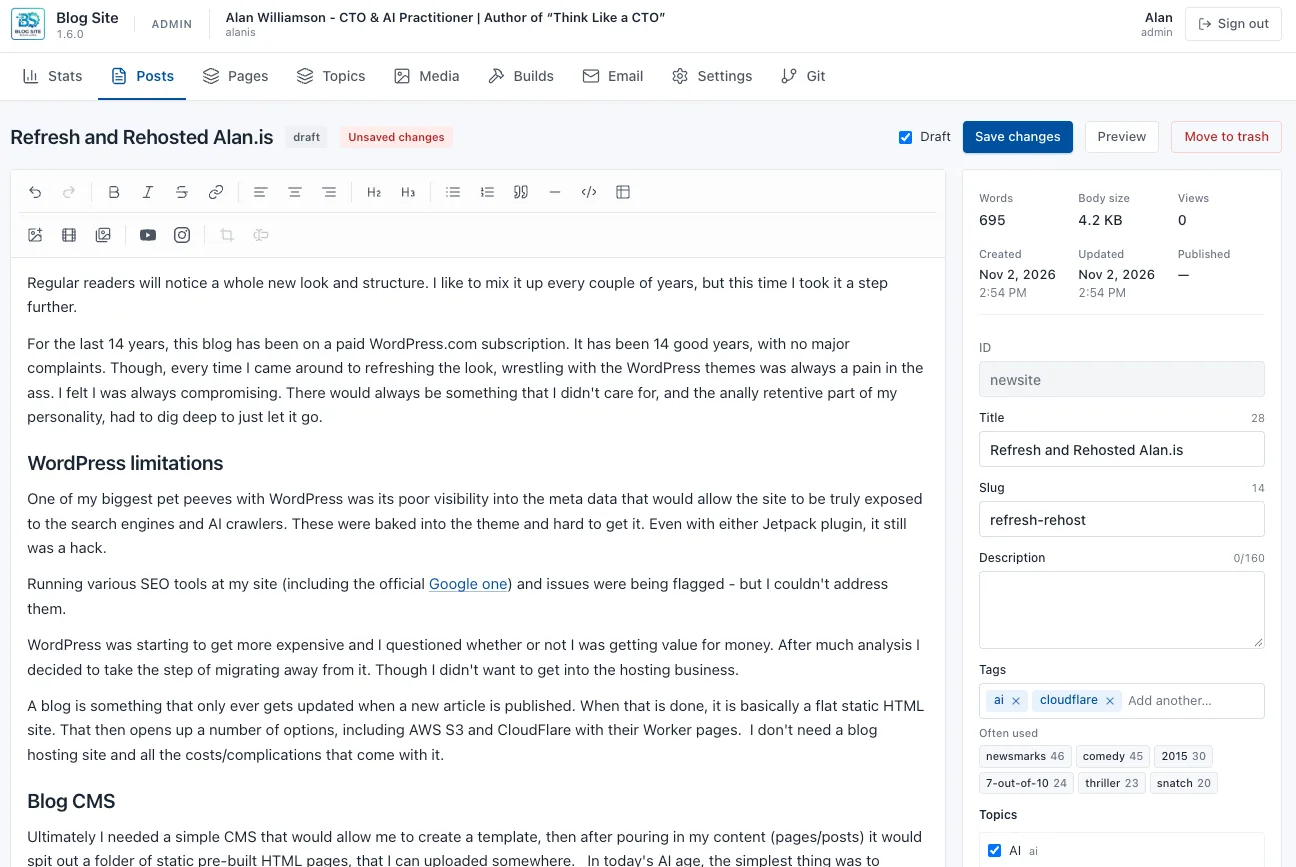
Therefore my CMS, was a utility to operate on the markdown files. My own version of Obsidian if you will, but focused towards publishing my content.
Cloudflare Worker Pages
Once I had that done, I needed somewhere to host my files. Cloudflare was the natural choice, with their workers/pages features, which is literally free for up to 100,000 hits per day. As popular as I hope this site to become, it is not yet at that daily traffic levels that is going to break that barrier.
Uploading here is a very simple "wrangler" (Cloudflare's CLI) call that takes a directory, and pushes it up. You even get a "page.dev" domain URL to the site you just uploaded for testing. Then mapping your domain over to this page, is a single click inside the Cloudflare domain.
Which incidentally, did I say that Cloudflare has free domain hosting and SSL termination? What isn't to like!?
Live Stats
One of the things I didn't want to lose was the actual view counts on each post. That was a nice feature on WordPress and as good as Google Analytics is, it's not easy to pull that out. Oh well, I will have to live without that. Or do I?
Cloudflare to the rescue again with its D2 service, and again another worker. A quick counter worker was developed that not only counted views, but also managed unique visitors. Again, a quick upload via "wrangler" had me all working within 10 minutes, thanks to my AI agent who plumbed everything in quickly.
My CMS app polls every so often (when I have it running) that fetches the content from D2 and updates the local markdown files with the counts.
Other Concessions
I have a subscribe button, that lets people put in their email, to be notified on new posts. Cloudflare Workers to the rescue again - I have a D2 collecting those emails, that my CMS polls pull down that list. I then created a separate "send email" area on my CMS, that pushes out the email via the reSend service (again a free service if not sending +1000 daily emails).
Search was another one you may think you need a server for. Well, given this is a blog site, with only a finite amount of published blog entries, it was relatively easy to make this client side. When someone clicks on the search box, it loads an optimized JSON file that is the content index of all the content, and the browser gets to work on that locally.
In Conclusion
I have successfully moved away from WordPress, with greater flexibility while reducing my overall running costs to $0. There is no doubt this would have been a much heavier lift had it not been for AI. But my AI agents had this all done within a single weekend, getting to the precise look that I wanted, while making it extremely SEO friendly.

In addition, I have reduced my vendor footprint, since my domains were already in Cloudflare, I have everything in a single manageable place. Cloudflare, hats off, have made things so easy. AWS is just so damn complicated these days, with so many services you have to use to just get a simple site up and running.
Were I WordPress, WIX, SquareSpace or any other website vendor, I would be very nervous. What they bring to the table, has dropped significantly, with you putting AI in the drivers seat as web developer and editor.
I have moved friends and clients over to this recently, where they now update their site by simply prompting with Claude, and it has opened their world, free from the constraints of their previous hosting platform.
In due diligence, we always came across one lonely unpatched WordPress self-hosted server sitting somewhere. Basically the trojan horse for attackers to gain access. We always recommended getting off of that as soon as possible. If this sounds familiar, talk to us over at Think Like a CTO and we can assist.
P.S. Gemini produced the “Remains of the Day (1993)” image.